
Yan Cui
I help clients go faster for less using serverless technologies.
Normally, with languages like C# or Java, there is quite a bit of overhead in creating a quick and dirty program to do small tasks like bulk renaming files in a director, etc. This is the spot that is filled by scripting languages like Python, Perl and Ruby, but did you know that you can write F# code in a scripting style too?
If you have F# installed, it will register the .fsx extension as F# script files. From within Windows Explorer you can execute it directly by selecting the “Run with F# Interactive” context menu option:
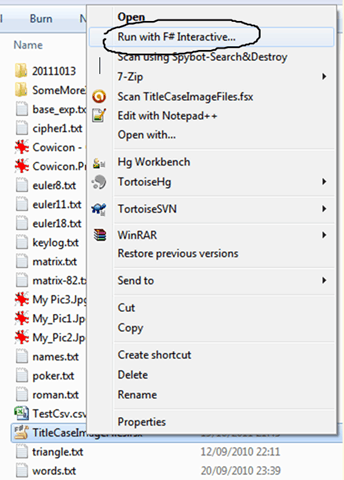
Executing a F# script file this way would send the file to the console version of F# interactive, fsi.exe.
You can also double click on the file to edit it inside Visual Studio, whilst writing F# as a script you have access to a number of compiler directives such as __SOURCE_DIRECTORY__ and __SOURCE_FILE__ which returns the current directory and filename respectively.
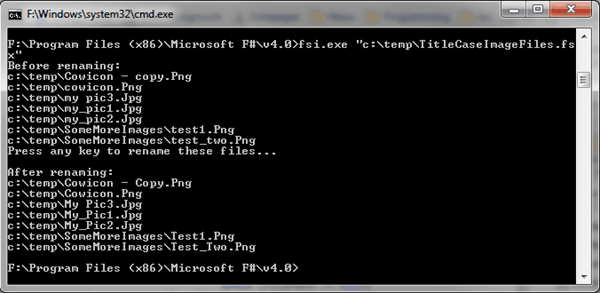
As a simple example, here’s a script I put together in 5 minutes that identifies image files in the current directory and sub-directories and renames them to be title cased, e.g. “my_image.jpg” will become “My_Image.jpg”.
Executing this script gives the following output:
Parting thoughts…
Using F# in this fashion has the obvious benefit that you don’t have to learn another language just so that you can hack some scripts together to perform simple tasks for you. Build automation tools is one area this can be very useful. Inspired by the Rake build tool of the Ruby world – which allows you to write your build script in Ruby – we now have a Fake build tool that lets us do the same with F#.
Another benefit of using F# as a scripting language is performance. Scripting languages typically sacrifices execution speed for the ease of modifying and deploying. F# on the other hand, is not interpreted and is always compiled first so it can be faster than pure scripting languages.
Whenever you’re ready, here are 3 ways I can help you:
- Production-Ready Serverless: Join 20+ AWS Heroes & Community Builders and 1000+ other students in levelling up your serverless game. This is your one-stop shop to level up your serverless skills quickly.
- Do you want to know how to test serverless architectures with a fast dev & test loop? Check out my latest course, Testing Serverless Architectures and learn the smart way to test serverless.
- I help clients launch product ideas, improve their development processes and upskill their teams. If you’d like to work together, then let’s get in touch.