
Yan Cui
I help clients go faster for less using serverless technologies.
Series so far:
In my previous post I mentioned some of the shortcomings with Amazon SimpleWorkflow (SWF) which drove me to create an extension library on top of the standard .Net SDK to make it easier to model workflows and business processes using SWF.
In this series of blog posts I’ll give you more examples of how to use the library to model workflows to be executed against the SWF service to take advantage of the reliable state management and task dispatch it offers, but none of the plumbing and boilerplate code you would have to deal with using the SDK.
Before we start looking at examples, let’s have a quick recap of the SWF terminologies:
- A workflow is a sequence of steps that are loosely strung together by the decisions the decider makes each time the state of the workflow changes. E.g. step 1 complete then schedule step 2 to commence.
- A workflow execution is an instance of a particular workflow currently being executed, many executions of the same workflow (identified by name and version) can be in flight at the same time. A workflow execution can be started with string as input and it can return string as output.
- A decision task is a task that is scheduled each time a workflow’s state changes.
- A decider is a component in your application which is responsible for polling SWF for decision tasks and respond with decisions. The sequence of steps that need to be performed by the workflow is ultimately determined by the decider.
- An activity task is a task that is scheduled by a decider, it takes a string as input (along with several other pieces of data which it can be scheduled with) and returns a string as result.
- An activity worker is a component in your application which is responsible for polling SWF for activity tasks and respond with completion or failure signals, as well as providing regular heartbeat signals. If the decider is responsible for scheduling work to be done, then the activity worker is responsible for doing the actual work.
- A child workflow is a workflow that is scheduled by the decider as a step in a workflow, similar to an activity.
- The decider is able to schedule both child workflows and activities for a single step in a workflow, whilst child workflows can be rerun as an independent unit of work, activities cannot be rerun independently outside of the context of a workflow.
- Both workflows and activities need to be registered with the SWF service before they can be used.
These are the most common concepts/components you’ll see in SWF, but there are also less commonly used (in my opinion at least) features such as:
- Starting a timer to cause a timer event to be fired after some time.
- Signalling an external workflow execution to cause an event to be recorded in its execution history and a decision task to be scheduled. This is a useful way to allow inter-workflow communication, e.g. one workflow suspends itself, until another workflow sends it a signal and then it can resume with its execution.
- Recording a marker as means to provide additional information in the execution history of a workflow.
Example : Hello World
Consider a workflow where there is only one activity, which simply prints the input to the screen and echoes it back out.
If we start a workflow execution with the input “Hello World!” then we expect to see the input being printed to the console and then the workflow execution completed with the result “Hello World!”.
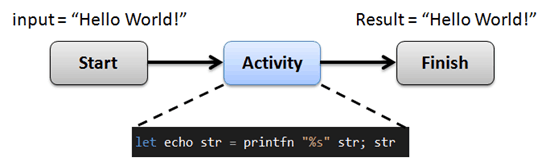
In its essence, you can think of an activity as nothing more than a function which accepts a string as argument and return a string, i.e. a fun with signature string –> string in F#.
With the standard .Net SDK you will need to write a decider for each workflow in order to provide the orchestration you need for that workflow. The decider logic tends to quickly become difficult to understand and maintain when the decision logic becomes more complicated, e.g. when multiple activities and child workflows are scheduled in parallel ,and you need to retry/fail activities/workflows, etc.
In my view, the decider is largely plumbing that developers should do without, so with the extensions library you should not need to write any custom decider code but instead, simply declare what activities and/or child workflows should be scheduled at each stage of a workflow and let the library do all the heavy lifting for you!
As far as workflow modelling is concerned, the only thing you need to do is use the custom ++> operator (inspired by Dave Thomas’s pipelets project) to attach additional steps to your workflow. So the above workflow can be modelled as:
and that’s it! No need to register the workflow and activity and write bespoke decider & activity worker yourself, the library does all of that for you, all you needed to do was to model the workflow you want.
Notice you haven’t had to provide any reference to SWF at all thus far, in fact, you only need to provide an instance of AmazonSimpleWorkflowClient (from the AWS SDK) when you start the workflow:
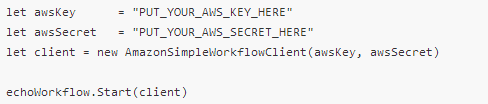
This way, it’s possible to run the workflow across multiple accounts simultaneously (dev, staging, prod, etc.) by calling the Start method with each of the client instances (one for each account), which fits well with the mobile worker model SWF is designed with – SWF holds the state but you can run your workers from anywhere in and out of the AWS ecosystem.
Once you’ve started the workflow, the library will automatically register the domain, workflow and activity for you if they are not present already. You can verify this by looking in the SWF Management Console:
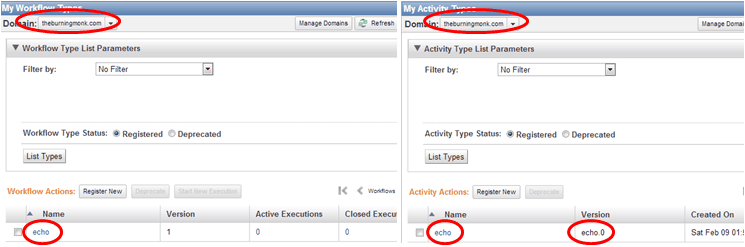
Notice that whilst we didn’t specify the “echo” activity with a version number, it’s registered with “echo.0”? I’ll go into more details on the versioning scheme in a later post, but for now let’s just be glad that we didn’t have to register these by hand!
Next, you can start a workflow directly from the management console, but ticking against the workflow you want to start and clicking the “Start New Execution” button:

Let’s follow through with the dialogue box and set the input as Hello World! as below:
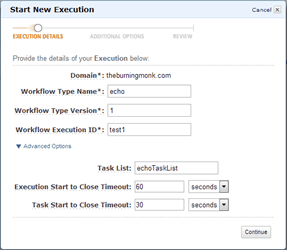
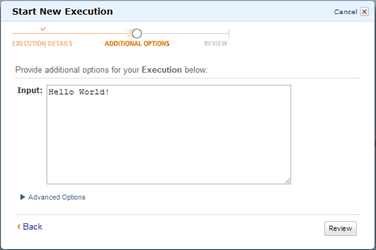
Once you start the workflow execution you will see Hello World! being printed in the console:
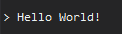
This is a sign that our echo function (which is invoked by the generated activity worker) had been called.
Back in the SWF Management Console, if you look under Workflow Executions, you should see the execution is closed after having completed successfully:
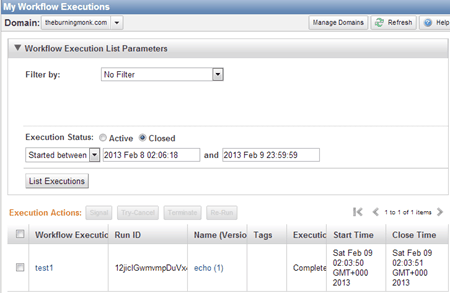
Clicking on the workflow execution ID allows you to see the sequence of events which had been recorded for this execution:
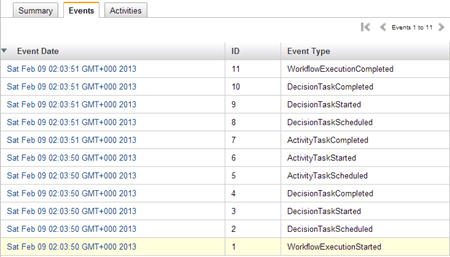
This is a very granular view of what happened during the workflow execution, giving you plenty of useful information if you ever need to investigate why a workflow execution failed, for instance.
If you switch to the Activities tab, you’ll get a more condensed view with just the activities that were scheduled, along with their inputs, results, etc.
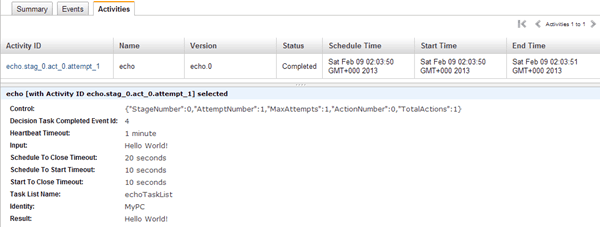
For now, ignore the JSON string in the Control field and the format of the Activity ID, these are both automatically generated by the library based on a set of conventions and will be covered by a later post.
So that’s it! I hope you can see that this extension library gives you a powerful way to express and model a workflow and focus your development efforts on the things that count (designing the process and writing the code that does the actual work) rather than wasting precious developer time on getting your code to work with SWF!
Parting Thoughts
For Java developers, there is an existing high-level framework (provided by Amazon itself) for working with SWF called the Flow Framework, which adapts a more object-oriented approach and in my opinion requires far more plumbing and most importantly does not
In case you’re wondering, this is how a solution to a similar Hello World example looks using the flow framework (taken straight from the flow framework developer guide) for your comparison:
Whenever you’re ready, here are 3 ways I can help you:
- Production-Ready Serverless: Join 20+ AWS Heroes & Community Builders and 1000+ other students in levelling up your serverless game. This is your one-stop shop to level up your serverless skills quickly.
- Do you want to know how to test serverless architectures with a fast dev & test loop? Check out my latest course, Testing Serverless Architectures and learn the smart way to test serverless.
- I help clients launch product ideas, improve their development processes and upskill their teams. If you’d like to work together, then let’s get in touch.
Pingback: Introduction to AWS SimpleWorkflow Extensions Part 2 – Beyond Hello World | theburningmonk.com
Pingback: F# Weekly #6, 2013 « Sergey Tihon's Blog
Pingback: Introduction to AWS SimpleWorkflow Extensions Part 3 – Parallelizing activities | theburningmonk.com