
Yan Cui
I help clients go faster for less using serverless technologies.
Amazon SimpleWorkflow (abbreviated to SWF from here on) is a workflow service provided by Amazon which allows you to model business processes as workflows using a task based programming model. The service provides reliable task dispatch and state management so that you can focus on developing ‘workers’ to perform the tasks that are required to move the execution of a workflow along.
Introduction to SWF
For more information about SWF, have a look at the following introductory webinar.
There are two types of tasks:
- Activity task – tells an ‘activity worker’ to perform a specific function, e.g. check inventory or charge a credit card.
- Decision task – tells a ‘decider’ that the state of a workflow execution has changed so that it can determine what the next course of action should be, e.g. continue to the next activity in the workflow, or complete the workflow if all activities have been successfully completed
Both the activity worker and decider needs to poll SWF service for tasks and respond with some result or decisions respectively after receiving a task. Each task is associated with one or more timeout values and if no response is received before the timeout expires then the task will timeout and can be rescheduled (in the case of a decision task, it is rescheduled automatically by the system).
Since tasks can be polled from just about anywhere (from an EC2 instance, or your home computer/laptop) and the tasks received can be part of any number of currently executing workflows, both the activity worker and decider should be completely stateless and can be distributed across any number of locations both inside and outside of the AWS ecosystem.
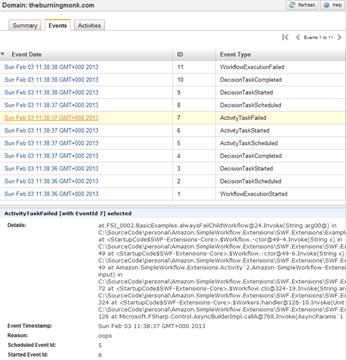
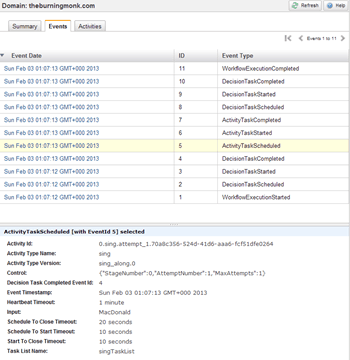
The history (as a sequence of events each keyed to a unique ID) of each workflow execution is available to view in the AWS Management Console so that you have plenty of information to aid you when investigating why workflows failed, for instance.
Consider the following example given by the SWF developer guide:
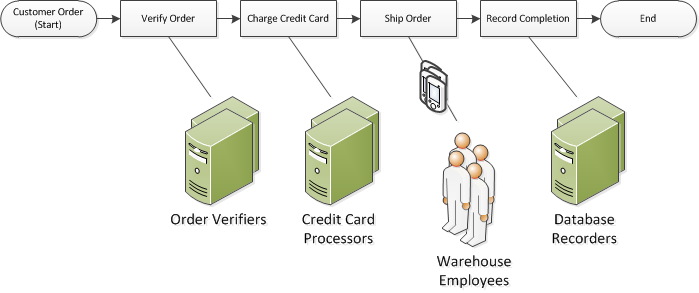
Each of the steps can be represented as an activity task and along the way the decider will receive decision tasks and by inspecting the history of events thus far the decider can schedule the next activity in the workflow, e.g.
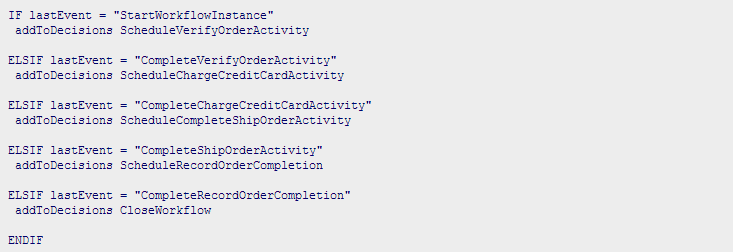
The actual SWF API is rather different so the pseudo code above tends to translate to something slightly more involved, which brings us to the topic of..
Short Comings of SWF
Workflows are modelled implicitly
In my opinion the biggest shortcoming with SWF is that the workflow itself (an order sequence of activities) is implied by the decider logic and at no point as you work with the service does it feel like you’re actually modelling a workflow. This might not be an issue in simple cases, but as you string together more and more activities (and potentially child workflows) and having to pass data along from one activity to the next and deal with failure cases the decider logic is going to become much more complex and difficult to maintain.
Need for boilerplate
The .Net AWSSDK provides a straight mapping to the set of actions available on the SWF service and provides very little added value to developers because as it stands every workflow requires boilerplate code to:
- poll for decision task (multiple times if you need to go back further than the max 100 events per request)
- inspect history of events after receiving a decision task
- schedule next activity or complete workflow based on last events
- poll for activity task
- record heartbeats periodically when processing an activity task
- respond completed message on successful completion of the activity task
- capture exceptions during the processing of a task and respond failed message
- …
Many of these steps are common across all deciders and activity workers and it’s left to you to implement this missing layer of abstraction. Java developers have access of a heavy-weight Flow Framework which allows you to declaratively (using decorators) specify activities and workflows, giving you more of a sense of modelling the workflow and its constituent activities. However, as you can see from the canonical ‘hello world’ example, a lot of code is required to carry out even a simple workflow, not to mention the various framework concepts one would have to learn..
A light-weight, intuitive abstraction layer is badly needed.
All activity and workflow types must be registered
Every workflow and every activity needs to be explicitly registered with SWF before they can be executed, and like workflow executions, registered workflow and activity types can be viewed directly in the AWS Management Console:
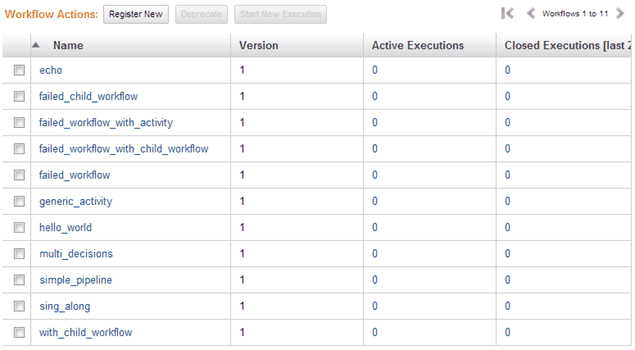
This registration can be done programmatically (as is the case with the Flow Framework) or via the AWS Management Console. The programmatic approach is clearly preferred but again, as far as .Net developers are concerned, it’s an automation step which you’d have to implement yourself and derive a versioning scheme for both workflows and activities. As a developer who just wants to model and implement a workflow with SWF, the registration represents another step in the development process which you would rather do without.
Another thing to keep in mind is that, in the case where you have more than one activity with the same name but part of different workflows and require different task to be performed, you need a way to distinguish between the different activities so that the corresponding activity workers do not pick up the incorrect task.
SimpleWorkflow.Extensions
Driven by the pain of developing against SWF because of its numerous shortcomings (pain-driven development…) I started working on an extension library to the .Net AWSSDK to give .Net developers an intuitive API to model workflows and handle all the necessary boilerplate tasks (such as exception handling, etc.) so that you can truly focus on modelling workflows and not worry about all the other plumbing required for working with SWF.
Intuitive modelling API
The simple ‘hello world’ example given by the Flow Framework can be modelled with less than 10 lines of code that are far easier to understand:
Here the ++> operator attaches an activity or child workflow to an existing empty workflow and returns a new instance of Workflow rather than modifying the existing workflow (in the spirit of functional programming and immutability).
An activity in SWF terms, in essence can be thought of a function which takes an input (string), performs some task and returns a result (string). Hence the Activity class you see above accepts a function of the signature string –> string though there is a generic variant Activity<TInput, TOutput> which takes a function of signature TInput –> TOutput and uses ServiceStack.Text JSON serializer (the fastest JSON serializer for .Net) to marshal data to and from string.
Exchanging data between activities
The input to the workflow execution is passed to the first activity as input, and the result provided by the first activity is then passed to the second activity as input and so on. This exchange of data also extends to child workflows, for example:
Starting a workflow execution with the input ‘theburningmonk’ prints the following outputs to the console:
MacDonald: hello theburningmonk!
MacDonald: good bye, theburningmonk!
Old MacDonald had a farm
EE-I-EE-I-O
To visualize the sequence of event and how data is exchanged from one activity to the next:
starts main workflow “with_child_workflow” with input “theburningmonk”
-> “theburningmonk” is passed as input to the activity “greet”
-> calls curried function greet “MacDonald” with “theburningmonk”
-> greet function prints “MacDonald: hello theburningmonk!” to console
-> greet function returns “theburningmonk”
-> “theburningmonk” is passed as input to activity “bye”
-> calls curried function bye “MacDonald” with “theburningmonk”
-> bye function prints “MacDonald: good bye, theburningmonk!” to console
-> bye function returns “MacDonald”
-> “MacDonald” is used as input to start the child workflow “sing_along”
-> “MacDonald” is passed as input to the activity “sing”
-> calls function sing with “MacDonald”
-> sing function prints “Old MacDonald had a farm” to console
-> sing function returns “EE-I-EE-I-O”
-> the child workflow “sing_along” completes with result “EE-I-EE-I-O”
-> “EE-I-EE-I-O” is passed as input to the activity “echo”
-> calls function echo with “EE-I-EE-I-O”
-> echo function prints “EE-I-EE-I-O” to console
-> echo function returns “EE-I-EE-I-O”
-> main workflow “with_child_workflow” completes with result “EE-I-EE-I-O”
Error and Retry mechanism
You can optionally specify the max number of attempts (e.g. max 3 attempts = original attempt + 2 retries) that should be made for each activity or child workflow before letting it fail/timeout and fail the workflow.
Automatic workflow and activity registrations
The domain, workflow and activity types are all registered automatically (if they haven’t been registered already) when you start a workflow. You might notice that you don’t need to specify a version for each of the activities, this is because there is an convention-based versioning scheme in place (see below).
Versioning scheme
Deriving a versioning scheme for your activities is at best an arbitrary decision and one that is required by SWF which adds friction to the development process without adding much value to the developers.
The versioning scheme I’m using is such that if an activity ‘echo’ is part of a workflow ‘with_child_workflow’ and is the 4th activity in the workflow, then the version for this particular instance of ‘echo’ activity is with_child_workflow.3.
This scheme allows you to:
- decouple the name of an activity to the delegate function
- reuse the same activity name in different workflows, and allow them to perform different tasks if need be
- reuse the same activity name for different activities in the same workflow, and allow them to perform different tasks if need be
Asynchronous execution
Nearly all of the communication with SWF (polling, responding with result, etc.) are all done asynchronously using non-blocking IO (using F# async workflows).
Currently, the extension library can also be used from F#, I’m still undecided on the API for C# (because you won’t be able to use the ++> custom operator) and would welcome any suggestions you might have!
As you can see from the Issues list, there is still a couple of things I want to add support for, but you should be seeing a Nuget package being made available in the near future. But if you want to try it out in the meantime, feel free to grab the source and run the various examples I had added in the ExampleFs project.
Enjoy!
Whenever you’re ready, here are 3 ways I can help you:
- Production-Ready Serverless: Join 20+ AWS Heroes & Community Builders and 1000+ other students in levelling up your serverless game. This is your one-stop shop to level up your serverless skills quickly.
- Do you want to know how to test serverless architectures with a fast dev & test loop? Check out my latest course, Testing Serverless Architectures and learn the smart way to test serverless.
- I help clients launch product ideas, improve their development processes and upskill their teams. If you’d like to work together, then let’s get in touch.
Pingback: Introduction to AWS SimpleWorkflow Extensions Part 1 – Hello World example | theburningmonk.com
Pingback: F# Weekly #6, 2013 « Sergey Tihon's Blog
Great article. This was originally written 2 years ago, and I’m looking to use SWF fairly heavily. I wanted to do know if you stuck with SWF or moved to another workflow framework. Really, what are your thoughts of SWF 2 years into it?
I’d summarise our experience with SWF as ‘it did the job’, nothing fancy, but sufficient for our purpose – we used it to drive our batch ETL process at the time which is now moving towards a Kinesis-based real time solution.
Pros:
– good visibility into what happened during a workflow execution
– integration with other AWS services (CloudWatch for monitoring, SNS for notifications, etc.)
– managed service
Cons:
– lack of an officially supported library for non-Java languages (hence I wrote one for .Net)
– simple API masks a lot of complexities & plumbing involved with building a production-ready app with it (robust error handling, heartbeat, boilerplate decision worker code, etc.)
– management console is not very user-friendly
Our ETL process involves quite a few layers of child workflows, each with its own set of activities, without a high-level API understanding and maintaining the ETL process would have been very difficult.
Whilst I’m happy with SWF in general, I do enjoy the simplicity of SQS and flexibility of Kinesis, and each have its place depending on your workload. With Kinesis however, only Java has an officially supported library, so we ended up rolling our own (both are open source too).
Hope this answers your question.
That’s a good article. Your library looks nice but the question is what can I do without a F#. My project is a C#-only thing so it’s critical to avoid F#. Is it possible?
Yup, you can use it from C# too, here’s some examples: https://github.com/fsprojects/Amazon.SimpleWorkflow.Extensions/blob/master/SWF.Extensions/ExampleCs/Program.cs
Hey Yan Cui,
I have released open source library C#.NET Guflow- https://github.com/gurmitteotia/guflow. It allows seamless development of workflows and activities with Amazon SWF. A look at some of its examples- https://github.com/gurmitteotia/guflow-samples should give you an idea about its capabilities. I will welcome your feedback and suggestions to improve it further.