
Yan Cui
I help clients go faster for less using serverless technologies.
Been a while since I’ve been meaning to check out Reactive Extensions for Javascript, I have been using the .Net version for a while now and blogged about some of the cool things you can do with the .Net version.
Although there are many sources where you can learn about it from they don’t have a structured guide to help you get started and some of the info/demo I found were pretty out-dated and not in line with the latest API. Among the articles I’ve read so far I found the series of articles by Matthew Podwysocki on codebetter.com to be most useful and definitely worth reading through if you want get up to speed with RXJS.
Anyways, back to the point of the post, I just wanted to show you how to achieve a simple drag and drop effect using RX, with support for clipping so you can’t drag the outside the parent container.
Here’s the basic HTML for the demo and with some simple CSS how it looks:
1: <body>
2: <div id="wrapper">
3: <div id="draggable"></div>
4: </div>
5: </body>

The javascript code for the demo is simple:
1: <script type="text/javascript" src="js/jquery/jquery-1.4.4.min.js"></script>
2: <script type="text/javascript" src="js/rxjs/rx.js"></script>
3: <script type="text/javascript" src="js/rxjs/rx.jQuery.js"></script>
4:
5: <script type="text/javascript">
6: $(function () {
7: var _doc = $(document), _draggable = $("#draggable"), _wrapper = $("#wrapper");
8:
9: // boundary so that the draggable content can't move outside of the its container
10: var _parent = _draggable.parent(),
11: _parentOffset = _parent.offset(),
12: _minLeft = _parentOffset.left,
13: _minTop = _parentOffset.top,
14: _maxLeft = _minLeft + _parent.width() - _draggable.outerWidth(),
15: _maxTop = _minTop + _parent.height() - _draggable.outerHeight();
16:
17: // get the stream of events from the mousedown, mousemove and mouseup events
18: var mouseDown = _draggable.toObservable("mousedown"),
19: mouseMove = _doc.toObservable("mousemove"),
20: mouseUp = _doc.toObservable("mouseup");
21:
22: // get the changes in the X and Y direction as the mouse moves
23: var mouseMoves = mouseMove.Skip(1).Zip(mouseMove, function (left, right) {
24: return {
25: xChange: left.clientX - right.clientX,
26: yChange: left.clientY - right.clientY
27: };
28: });
29:
30: // for each mouse down event, get all the subsequent changes in the clientX and
31: // clientY values resulting from the mouse move events until mouse up event occurs
32: var mouseDrags = mouseDown.SelectMany(function (md) {
33: return mouseMoves.TakeUntil(mouseUp);
34: });
35:
36: mouseDrags.Subscribe(function (mouseEvent) {
37: var oldOffset = _draggable.offset();
38:
39: // change the left and top
40: _draggable.css({
41: left: Math.min(Math.max(oldOffset.left + mouseEvent.xChange, _minLeft), _maxLeft),
42: top: Math.min(Math.max(oldOffset.top + mouseEvent.yChange, _minTop), _maxTop)
43: });
44: });
45: });
46: </script>
As you can see, this example uses jQuery and included in the RXJS package is a rx.jQuery.js file which contains a number of extension methods to use with jQuery such as the toObservable function which returns a stream of observable values. If this sounds unfamiliar to you I strongly recommend you to read through the first couple of articles by Matthew Podwysocki I linked above.
On line 23, I’m created a composite event stream by pairing mouse move events with their subsequent mouse move event to work out the change in the X and Y direction. To visualise the two event streams and the resultant mouseMoves stream:
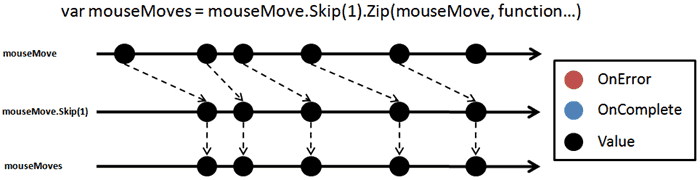
Then on line 36, I’ve subscribed an event handler for values pushed down to us through the mouseMoves stream. This event handler applies the X and Y changes to the <div> element’s left and top offset but caps them so that it can only be moved inside its container.
Demo
Parting thoughts
I used jQuery to demonstrate RXJS’s extension functions for jQuery but you don’t need jQuery in order to use RXJS, in the rx.html.js script file there is a very useful Rx.Observable.FromHTMLEvent function which lets you get an observable stream of events from any HTML events including IE-specific events such as ‘oncut‘.
Whenever you’re ready, here are 3 ways I can help you:
- Production-Ready Serverless: Join 20+ AWS Heroes & Community Builders and 1000+ other students in levelling up your serverless game. This is your one-stop shop to level up your serverless skills quickly.
- Do you want to know how to test serverless architectures with a fast dev & test loop? Check out my latest course, Testing Serverless Architectures and learn the smart way to test serverless.
- I help clients launch product ideas, improve their development processes and upskill their teams. If you’d like to work together, then let’s get in touch.
its amazing… but it does not work very well, at least on FF7 it seems like you have to click twice to let it see the mouseup event.